ResumeClear
Check My Resume

Check My Resume

A practical last check before you hit apply.

Files stay on your device

Full report, free

Upload your resume

Full report, free

Add a job description to see keyword matches and gaps.

Compare a second job / Target role
No signup requiredFiles stay on your device
A closer look at your resume

A practical last check before you hit apply.

How we score

Start with the highest-priority issue

Review parsed text against the original

Re-check the edited version

A worked example

See the evidence change

Illustrative example using this checker’s published rules. File warnings and wording changes are shown separately; results do not predict an employer’s decision.

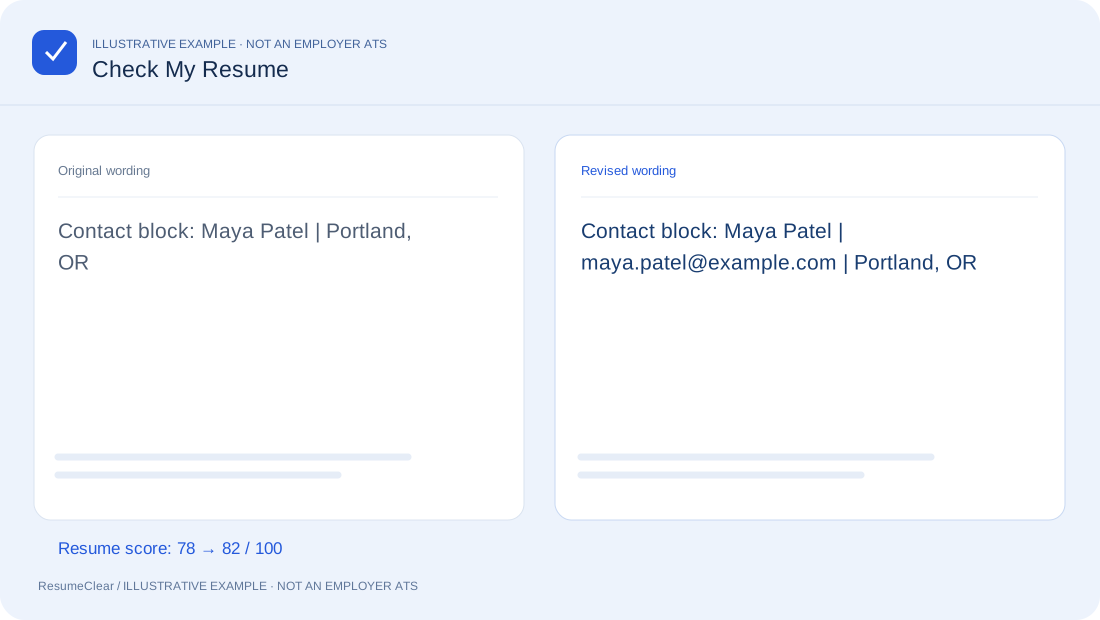
Check My Resume: Illustrated example report showing source evidence, an accurate revision and the resulting checks.
Fictional example. Preview the report with the same rules used for your resume.
Read the example text
Original wording
Contact block: Maya Patel | Portland, OR
Revised wording
Contact block: Maya Patel | maya.patel@example.com | Portland, OR
Resume score7882A compatibility reference, not an employer’s ATS score or a hiring guarantee.

A short pre-application review

Start with the file you intend to submit, not an older draft. Check the parsed contact details, then review high-priority document issues. This catches a different class of problems from proofreading the visual PDF alone.

One issue, one accurate edit

Use source-line links to find the sentence behind a suggestion. Fix the most consequential issue first, then re-check. The score is repeatable for the same input, but a higher number is useful only when the revised content remains truthful and relevant.

Keep a submission-ready copy

Report download contains analysis, not a newly formatted resume. Apply your chosen changes in the original editor, export a supported file, and upload it again for a final parse check. Follow any file-format instructions in the vacancy.

From upload to a stronger application.

Bring your resume

Upload a text-based PDF or DOCX, or paste your text. A job description is optional.

See what needs attention

Inspect the parsed text, score breakdown and issues tied to your original lines.

Make a change. Check again.

Edit a bullet, verify the facts, then re-check. Your report stays free.

FAQ

Questions before you upload?

English resumes only. PDF text extraction and DOCX paragraphs are checked; visual fonts, all tables, and every ATS layout behavior cannot be verified. Scanned PDFs need OCR elsewhere.

Which draft should I upload?+

Start with the file you intend to submit, not an older draft. Check the parsed contact details, then review high-priority document issues. This catches a different class of problems from proofreading the visual PDF alone.

How should I work through the fixes?+

Use source-line links to find the sentence behind a suggestion. Fix the most consequential issue first, then re-check. The score is repeatable for the same input, but a higher number is useful only when the revised content remains truthful and relevant.

What does the downloaded report contain?+

Report download contains analysis, not a newly formatted resume. Apply your chosen changes in the original editor, export a supported file, and upload it again for a final parse check. Follow any file-format instructions in the vacancy.

Is the full resume check free?+

Yes. You can see every score, issue and extracted line without an account. Basic checks, two-JD comparison and report printing are free.

Does my resume leave my device?+

Basic checks run in your browser. Files and job descriptions are not uploaded. AI rewriting is optional and sends only the selected text to our server and Cloudflare Workers AI after your consent.

Is this my actual ATS score?+

No. Employers use different systems and rules. This is a reproducible heuristic check, not an employer score, ranking prediction or guarantee. AI is used only for optional rewriting.